
At a memorial or a wedding, most people have more to say than fits on a card. A voice message lets them say it the way they would say it to your face: the story, the laugh, the nickname only they used. Here is how to collect those messages from everyone who comes, and from the people who cannot, and keep them together in one book.
This guide uses a Say it Again group keepsake. You can try the guest view before you start.
What you need before you start
- The name of the person or couple, and the date of the service or celebration.
- One question or welcome line that tells guests what to talk about.
- A photo for the cover, if you have one you love.
- A place for the QR code: a sign by the door, a card on each table, the printed program or a screen.
The organizer pays once, and that opens the book for messages. Guests never pay, and they never need an account or an app.
1. Set up the book
Choose a memorial, wedding or celebration design. Add the name, the date, your welcome and the cover photo. You sign in to manage the book; everyone else only scans.
2. Put the QR code where people will see it
Every book comes with printable signs that carry its QR code. Pick what suits the room:
- A letter or A4 sign for the table by the entrance.
- An 18 × 24 or 24 × 36 inch sign for an easel.
- Table tents, or 4 × 6 and 5 × 7 inch cards for each table.
- A small QR block for the printed program or order of service.
- A square image to text to people who cannot be there.
- A version for a TV or tablet screen, and a 5 × 7 inch layout for an engraved plaque.
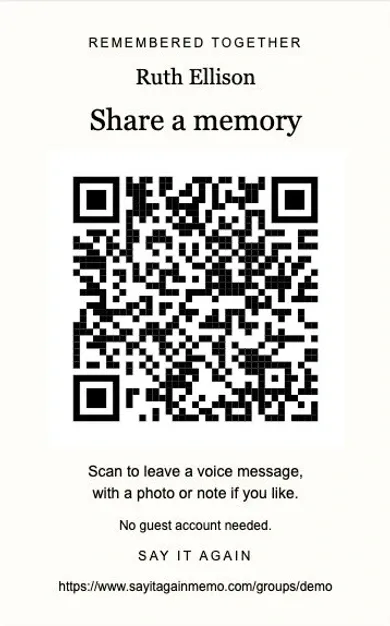
Say what the code is for right beside it, such as “Scan to leave a voice message for Ruth.” Print one copy early and scan it with a phone before the day. If you are adding the code to a printed program, our page on QR codes in a funeral or memorial programme covers size and placement.
3. Guests leave a message from their phone
Guests point their phone camera at the code and record a message of up to one minute. They can add one photo and a short note, and say when the memory happened so it can sit on a timeline. Guests do not install anything.
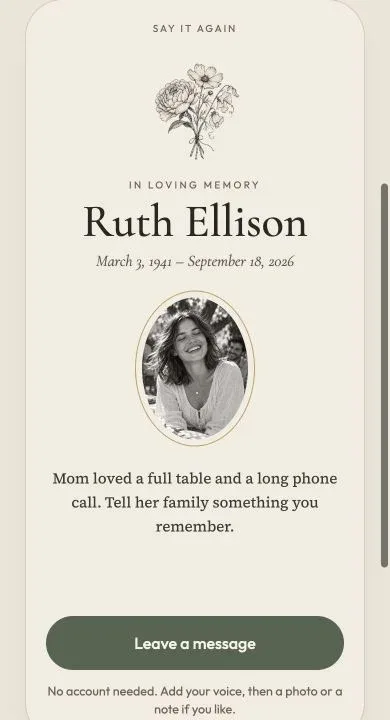
When they finish, guests get a private receipt that lets them replace or withdraw what they left. Messages stay open for 14 days after the event date, so people who could not come can still add theirs. You can move that deadline or close it early.
Give people something to talk about
A blank screen makes people freeze. One clear question in your welcome does more than a long explanation. A few that work:
- For a memorial: “Tell us about a time she made you laugh.”
- For a memorial: “What did he teach you that you still use?”
- For a wedding: “What is your advice for their first year?”
- For a birthday or retirement: “What do you want them to hear today?”
There are more prompts on What to say.
4. Review what came in
Nothing appears in the book until you approve it. Messages wait in a review list where you can listen, read the notes, and approve or hide each one. You can search by a name or by words in a note. A book holds up to 300 contributions.
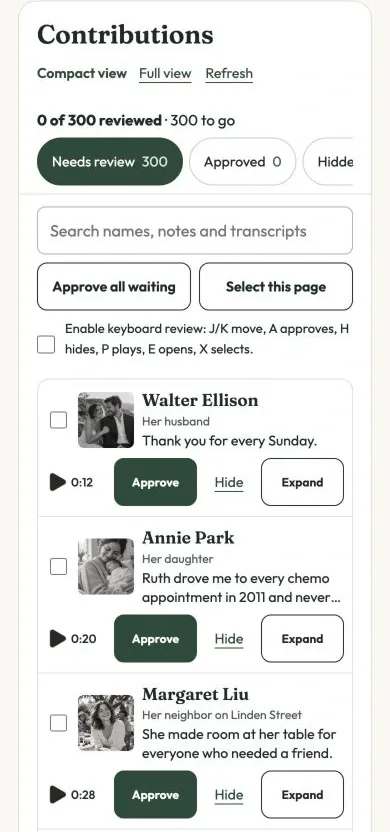
After messages close, a transcript of each recording is suggested for you. Correct it before you publish, and the book becomes searchable by what people said.
Hiding a message keeps it out of the book but does not delete it. Everything you received stays in a private download for you.
5. Arrange it and publish
Put the messages in the order you want them heard. Preview the book, confirm that you have reviewed it, and publish.
You get a link to the book and a second QR code that opens it, which you can print on thank-you cards. You can also let the sign's original QR code open the book once messages have closed, so the same printed code works before and after.
6. Share it and keep a copy
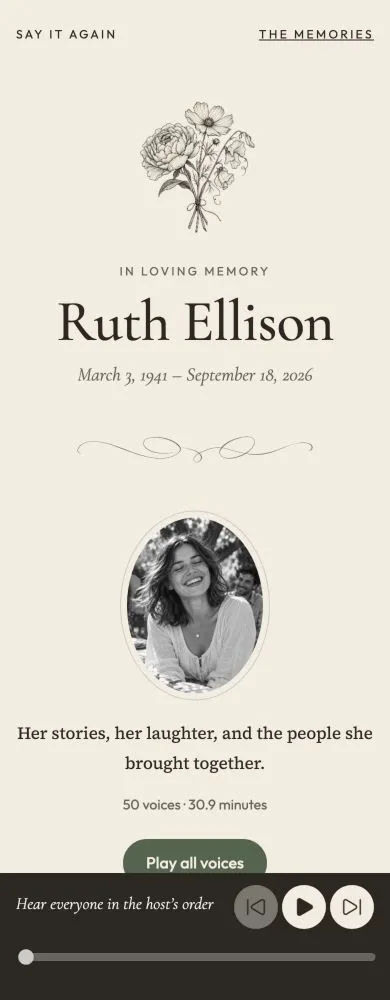
The book opens in any phone or computer browser. Family can search for a name or a phrase, play one voice, or press Play all to hear everyone in the order you chose. They can also switch to a timeline built from the dates guests gave.
The link is unlisted: anyone you give it to can open it, and search engines are asked not to list it. You can pause sharing at any time, or replace the link if it reaches the wrong people. Replacing it also stops any printed QR code that used the old link.
Then download two copies and keep them somewhere safe:
- The keepsake archive: the published book with its recordings, photos and notes. It opens on your computer without the internet.
- The full event archive: everything you received, including the messages you hid. Keep this one private.
We keep the book online for you, and there is nothing to renew.
Can you change it after publishing?
Yes. You can hide a message, reopen the book for late messages, and publish the update. Copies that people already downloaded stay as they were.
To see every stage on one book, look at a book from start to finish, or start your own.